Sunday, April 19, 2015

How to use Figaro with Travis CI

Although I knew that including my Facebook app_id and app_secret on the omniauth.rb file is a security risk but I went ahead because I could reset it anytime I wanted. However the correct way of handling the sensitive API keys or database credentials is by never committing them to version control. Also the 3rd commandment of a 12 factor app is to store them in environment variables!

I decided to use figaro and got up and running fast. You should follow their tutorial in the Github page. After I ran the figaro install command I added the configuration values to the application.yml. My application.yml file looked something like below (but of course with the correct credentials). Note that setting the values in "quotes" is important as otherwise you'd get errors when trying to set the keys in heroku.

app_id: "342342342343"
app_secret: "1233866op343435212389267622c123b"

production:
  app_id: "342342342343"

  app_secret: "4563866ba3434352b4569988222c466a"

Then the next task was to set the production credentials in heroku. That was easily done with 

figaro heroku:set -e production

Ran the specs (All green!), committed and pushed to Github. After that it was smooth sailing for me! Or was it ?

Travis CI sent an email immediately complaining that the build was broken. I checked and all my specs were broken and to see why, it was because I added the following line in application.rb


Figaro.require_keys("app_id", "app_secret")

So the environment variables were not set in Travis and it wouldn't run any of the specs. Figaro would throw the following error if the required keys are missing.

Missing required configuration keys: ["app_id", "app_secret"] (Figaro::MissingKeys)

So how to set the environment variables? Turns out Travis CI provides a gem that can encrypt the environment variables and add them to travis.yml, and they will be set before running specs.

After I installed the 'travis' gem it, I used the travis encrypt command to get encrypted values.

travis encrypt FOO=bar

You can use the -a option to automatically add it to the travis.yml as well.

After the values were added to the travis.yml file, it looks as shown below. Note that the the encrypted "secure" variable includes BOTH the environment variable name and value.

language: ruby
rvm:
  - "2.2.1"
# uncomment this line if your project needs to run something other than `rake`:
script:
  - RAILS_ENV=test bundle exec rake db:migrate --trace
  - bundle exec rspec spec/
env:
  global:
    - secure: "VERY LONG ENCRYPTED KEY VALUE ENV VAR"
    - secure: "ANOTHER VERY LONG ENCRYPTED ENV VAR"

I committed this file and pushed to Github and then Travis could the find environment variables and build successfully. The result was green like a cuke!

Wednesday, June 13, 2012

JsonMappingException when serializing POJO reverse engineered using Hibernate, to JSON

We were working recently on a Java project with Hibernate as the ORM. We created the database and reverse engineered the entities to POJO using Hibernate (See how).

I am putting up a simple ER diagram to demonstrate the issue.

Each Item has a list of item details which are name/value pairs.


And we needed to serialize this object to JSON so we used Jackson. And when trying serialize we were confronted with an exception.

org.hibernate.LazyInitializationException: failed to lazily initialize a collection of role: ItemDetail.item, no session or session was closed

Closely looking at the generated ItemDetail class I found that there was a Item defined there. 

   @ManyToOne(cascade={}, fetch=FetchType.LAZY)  
   @JoinColumn(name="item_id", unique=false, nullable=false, insertable=true, updatable=true)  
   public Item getItem() {  
     return this.item;  
   }  
   public void setItem(Item item) {  
     this.item = item;  
   }  

The first (stupid) thing I tried was to change to FetchType from LAZY to EAGER. which I thought would solve the problem.  However that resulted in a StackoverflowException because the serializer kept recursing and it would never reach the end.

 Exception in thread "main" org.codehaus.jackson.map.JsonMappingException: Infinite recursion (StackOverflowError) (through reference chain: ItemDetail["item"])

The problem here is that Hibernate provides us a way to navigate back using the foreign key relationship where in this instance to get the parent Item that belongs to each ItemDetail. But Jackson did not like it!

The solution was VERY simple.

Simply inform the serializer to ignore such parent relationships. You can inform Jackson to leave it aside using @JsonIgnore (See all the annotations here).

   @ManyToOne(cascade={}, fetch=FetchType.LAZY)   
   @JoinColumn(name="item_id", unique=false, nullable=false, insertable=true, updatable=true)   
   @JsonIgnore  
   public Item getItem() {   
    return this.item;   
   }   

And Jackson did not try to serialize it and it worked just as expected!

Saturday, June 2, 2012

Setup and forget automated backup with Cobian + Your favorite cloud hosting app!

There are numerous file cloud syncing/backup tools available such Sugar Sync, Dropbox, SkyDrive, Box.net and Google Drive to name a few.


These tools helps you keep your files safe in the event of a disk failure, virus attack or any other destructive situation, automatically.

You add a file/folder to the "special" sync folder and all is backed up and synced or use "selective sync", a highly sought after feature implemented in most applications, to select which folder to be synced to the cloud.

Now this is all good. But there are times when you really don't want some files to be synced always, all the time. The perfect example is the Outlook PST file which stores all your emails. You want it to be backed up, but it's going to be a waste of bandwidth if each time an email arrives and your file starts syncing to the cloud. There maybe many other such files that need not be synced ASAP.

What you need is some way to specify WHEN exactly do you want the sync to happen. How awesome would it be if you can tell "Hey, backup this file/folder every hour, every 135 minutes, every week or every first Monday and Thursday" ?

Cobian Backup to the rescue! I was looking for a flexible backup solution and found a gem. Luis Cobian has created a wonderful piece of software. Kudos!

Download Cobian Backup version 11 (Code named Gravity) , the latest as of writing and install it. I am assuming you have your sync tool installed as well.

Once Cobian Backup is installed, in the "Task" menu, click "New Task" or alternatively press Ctrl + A to add a task.


Note the setting "Use Volume Shadow Copy". Using that option, you can be sure that your file can be backed even while it's locked by an application.

After that add a source which could be any file or folder that you want to backup. The destination should be your magic folder (Dropbox/SugarSync Magic Briefcase") or any folder setup to be selectively synced. You can have multiple sources and multiple destinations.


As you can scheduling is very advanced and will cater to almost any need.


There's compression + industry standard encryption too!


with filters!


 I unfortunately cannot go through all the features in Cobian backup due to the sheer size!

So the idea is to use Cobian Backup to backup your files to the synced folder and you have a bullet proof, automated backup!

Download Cobian Backup

Thursday, March 8, 2012

The new iPad : Resolutionary!

No it's not iPad 3 or iPad HD! It's the new "iPad". 

Nothing entirely innovative or NEW, but the spec bump beats most of the tablets out there!


So there's a reason after call Apple calls it resolutionary! The resolution of the retina screen is 2048 x 1536 pixels with a 264 pixels per inch!

Other notable features are the new processor and GPU that Apple calls A5X and it claims to be twice as fast and contains four times the graphical processing power than the Tegra 3. Goodbye Asus Transformer Prime? Probably. It's still dual core, though.

There's a new camera, a 5MP, obviously with 1080p recording and the front VGA camera is still present.

There's 4G LTE connectivity too!

With all the processing power, the battery life still seems to be par with the iPad 2!

The 16GB WiFi Only Model starts from $499. Go, pre-order!

More info on New iPad: The Third Generation article on Gizmodo.

Monday, March 5, 2012

Android Key Lime Pie to follow Jelly Beans!

Yesterday it was confirmed that Jelly Beans will follow Ice Cream Sandwich in the Android sweets related OS naming convention.

However, therage.com has uncovered what's next. I took a wild guess thinking it would be Kola Kubes but it's Key Lime Pie!


Image courtesy of http://kestrachern.net

Sunday, March 4, 2012

It's confirmed! Android 5.0 will be called Jelly Beans

It's been a while since we knew that the next version of Android (After ICS) would be called Jelly Beans. But now, Asus has confirmed it! Speaking to TechRadar, ASUS' Corporate Vice President Benson Lin has said


"Asus is very close to Google, so once they have Android 5.0 I think there will be a high possibility that we will be the first wave to offer the Jelly Bean update."


So the version number 5.0 indeed will be called Jelly Beans.

Also, placed in the middle of Google's private meeting area is a bowl of Jelly Beans!

  google jelly beans
(Image courtesy of theverge.com)

So what's next ? Kola Kubes ?

Information taken from GSMArena.

Monday, February 27, 2012

HTC announces the One Series at MWC

HTC announced the HTC One Series a while ago at MWC held in Barcelona. Four phones were officially announced namely, One X, One XL, One S, and One V.

Sorted by top to bottom specification wise, HTC One V is the smallest of 'em all.

HTC One V


One V runs 1GHz single core processor with 512MB RAM and packs Ice Cream Sandwich inside coupled with their proprietary Sense UI. The resolution is 480 x 800 pixels on a 3.7 inch screen.

See the HTC's One V Page website for more information.


HTC One S


One S packs dual core power clocked at 1.5 GHz with an Adreno 225 GPU. With 1GB of RAM and qHD resolution of 540 x 960 on a 4.3 inch screen, HTC One S takes pictures at 8MP resolution. According to the HTC website, HTC One S supports only microSIM.

See the HTC's One S Page website for more information.

HTC One XL


The XL lives up to the name! Almost similar to the One S but with a beastly 4.7 screen with a 720p resolution and supports LTE!


See the HTC's One XL Page website for more information.

HTC One X


This is the beast that's going to storm the world of Android! Gizmodo calls it the "The Most Exciting Android Phone to Date"

One X (reminds of me of Professor X) is packs serious power inside. When I say serious, it's quad core serious! This beast with such raw power and magnificence was called HTC Endeavor, HTC Supreme and HTC Edge before.

Running on a Nvidia Tegra 3 clocked at 1.5 GHz this phone boasts 1GB of RAM. One X is equipped with the same screen as the One XL.

All these phones run the HTC Sense UI on top of Ice Cream Sandwich (Android 4.0)

HTC One X vs HTC One XL


They look almost the same with One XL packing LTE connectivity which One X lacks. Also One X is running on a quad core while XL is limited to a dual core.

Super IPS LCD2


We are yet to here more information on the Super IPS LCD2 which is the screen technology used in One X and XL.

But  @PaulOBrien  says

"I have never seen a screen like the SLCD2 on the@htc One X. Totally blew me away, INSANE. Made my Galaxy Nexus look 10 years old."


Looks like it's some beauty!

Check HTC  and GSM Arena for more information

Sunday, February 26, 2012

Samsung Galaxy Beam - Presentation time!

Samsung just before the MWC has announced a new phone! With a projector!

According to GSMArena, "the projector uses a 15 lumens lamp that is capable of projecting a 50-inch wide high-definition image."


What is interesting is that Samsung already introduced a Galaxy Beam before in February 2010. It was called Samsung I8520 Galaxy Beam. However it's not as powerful as the new Galaxy Beam. See the comparison here.

Check the link below for more information.

Windows Desktop UI Concept

This guy is seriously awesome! I am not a big fan of fancy user interfaces but this is just pure brilliance!

I wouldn't mind using an interface like this at all!

Hope this at least comes as a shell replacement for Windows 8.

Desktopthumb_medium


Desktopthumb_medium

Check the article for more photos in the link below.

Windows Desktop UI Concept | The Verge Forums

Saturday, February 25, 2012

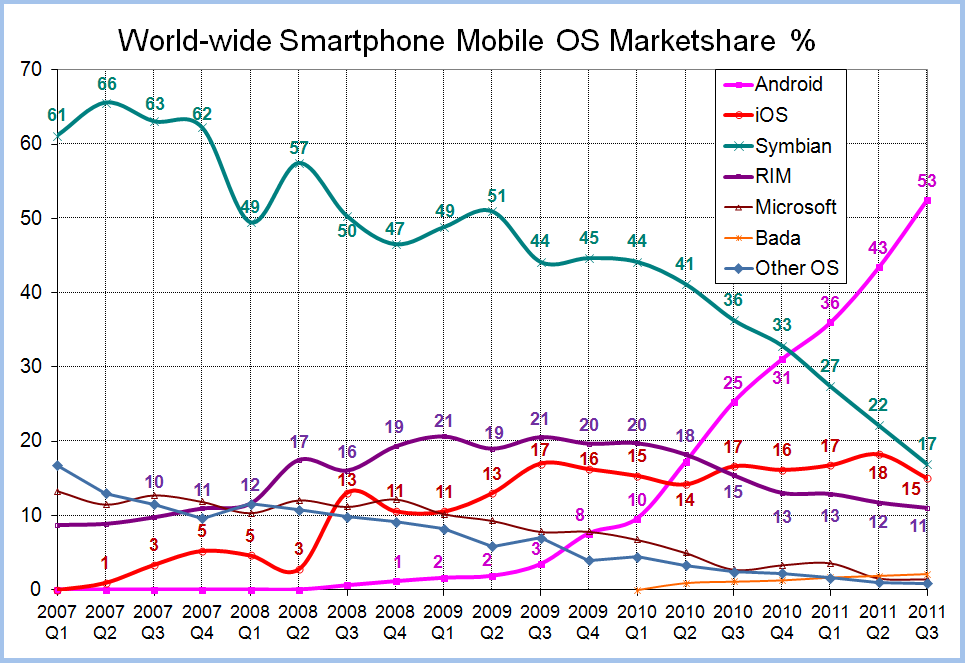
Interesting Statistics on Worldwide Smartphone Market Share

Came across this image when I was surfing and I am thrilled to see Android's steady and massive growth. A definite explanation to such growth is the fact that Android phones are manufactured by many companies (in contrast to iPhone only by Apple) and there are many low-budget devices running it.

iOS certainly doesn't seem to catch up and I am baffled as to why. Although it had some issues with the battery, iPhone 4S was a massive success (or so I heard).

I badly want Windows Phone 7 to catch up! Although I am an Android fan, the beauty and simplicity of Windows Phone 7's interface has got me hooked up. And according to GSMArena, we are going to see cheaper WP7 phones introduced at MWC this year at Barcelona. That is a good sign! Not everyone can spend an year's salary on a phone.


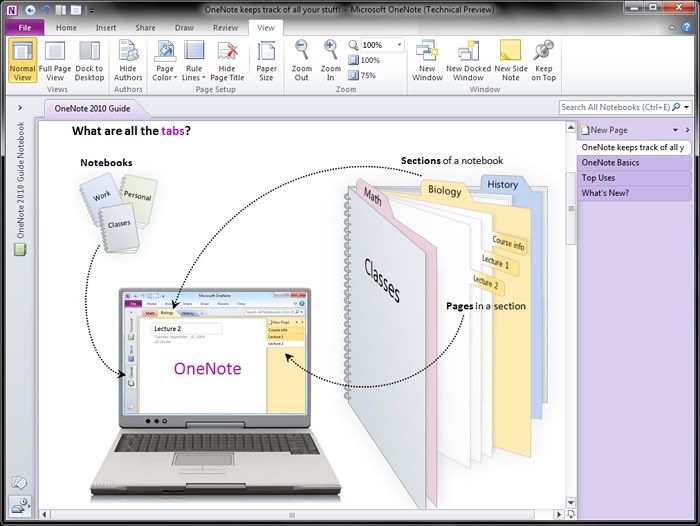
My Best Productivity Tools (One Note)


There are quite a few software that I use daily or once in a while to get things done in a more productive way or be productive. So I thought of listing down a few of my most used and trusted software. This is in no way a Top N Productivity Tools post or neither is a complete one. I’ll try to be concise and precise. Oh and by the way, I use an Android powered smart phone, so don’t be surprised to a see a few Android apps on the list. I’ll cover an app each in a post! Here goes the first!

  Microsoft OneNote
 
One Note is first, because it IS my number one productivity tool. I don’t know where I’d be without it. The companion Android application that was released recently is pure bliss.

Need something organized ? OneNote to the rescue! My office life would be a giant mess if it wasn’t for OneNote. I have everything from meeting notes, documents, task updates from team members to research documents, personal notes, brainstorming sessions and to do lists organized all thanks to the wonderful piece software from Redmond.

I tried Evernote and loved it because it could sync with my Android device but I didn’t fall in love with the tags concept or the number of hierarchical layers that it could divide my work in to.

In contrast, in OneNote, I have a notebook for each of my projects and I have a number of sub layers all neatly organized. I just love all those hierarchical organization capabilities! And automatic text recognition in the images is neat! It would suck to add all my office to-do lists in to my phone but One Note handles it like a boss! Adding a task is one click and automatically adds that task to Outlook too. It’s easier than having another to do list app.

Seriously, if you need everything organized in your life; office or home, OneNote is a gem! 
Now that OneNote syncs with my Android and integrates nicely with SkyDrive (you can edit OneNote documents in the browser!), my notes can be accessed where ever I have a browser and an Internet connection. 


P.S : NO, I am not a MS fan boy!

Await more productivity tools!


Sunday, July 10, 2011

ActionScript Regular Expression Tester/Visualizer

Here is an improved version of my older post. Given that I already had the index of each occurrence in my hand, why not visualize it ? I chose the RichText spark component to show the matches.

I wanted to make the font style to bold and change the color to red of each match. I first thought of looping through each occurrence and concatenating to produce the RichText. But it wasn't necessary at all. The replace function of string took in a RegEx and all was easy. The replace function not only took in RegEx but also had the functionality to include the matching string in the replacement string as a parameter. That's right! The parameter is $&. See the code below. Oh and I had to handle the new lines too.

var expression:RegExp = new RegExp(txtRegularExpression.text, "g");                        
                                                
var newLineExpression:RegExp = new RegExp("\\n", "g");
                        
var stringToShow:String = txtStringToMatch.text.replace(newLineExpression, "<br/>");
                        
stringToShow = stringToShow.replace(expression, "<b><font size='12' color='#FF0000'>$&</font></b>");
                        
richText.textFlow = TextConverter.importToFlow(stringToShow, TextConverter.TEXT_FIELD_HTML_FORMAT);

Saturday, July 9, 2011

ActionScript Regular Expression Tester

Here is a little tool I created using Adobe Flex to match a string against a regular expression. It tries to mimic the functionality of matches() function in .NET Regular Expression to return an array of matches. I have another idea to improve this, so I am back to work!

Here is matches function that I used. The application is after the code.

public static function getMatches(expression:RegExp, stringToMatch:String):Array
        {
            if (!expression.global)
            {
                throw new Error("expression.global is not true!");
            }
            
            var matches:Array = new Array();
            
            var allMatchesFound:Boolean = false;
            
            while (allMatchesFound == false)
            {
                var match:String = expression.exec(stringToMatch);
                
                if(match != null)
                {
                    matches.push(match);
                }
                else
                {
                    allMatchesFound = true;
                }
            }
            
            return matches;
        }


Friday, June 24, 2011

Commit using shortcut key in TortoiseSVN (Windows)

I always needed to automate committing in TortoiseSVN. Sure, it was not a very big deal to right click a folder/file and click commit but still how awesome would it be if I just use a shortcut key?

This led me to to this stackoverflow question which basically leads to this article. Cool! Just what I wanted!
Well, not quite. It does show that we should call TortoiseProc.exe with the required parameters, but acquiring the parameters (selected folder/file) in Windows Explorer is the tricky part. Not to mention, that it should happen when a shortcut key is pressed.

Well the whole process was surprisingly easy, thanks to QTTabBar. QTTabBar is one awesome piece of software which enables, tabbed browsing for Windows Explorer which is its major feature. Plus, it has a plethora of other goodies which makes Explorer down right lame.

Take a look at those lovely Tabs!

image

So the feature that we are going to use is "Applications".

Once QTTabBar is installed, right click on the bar, and select Options.


From Options, go to the Applications tab.

Then from there, select the + button to your top right (the one without the folder icon). Type a name "Commit"

From there, set the options as follows.

1. The path should be of course where you installed TortoiseSVN.
2. Leave the arguments as it is, unless you know what other arguments you need to pass in.
3. Assign a shortcut key and presto!

C:\Program Files\TortoiseSVN\bin\TortoiseProc.exe
/command:commit /path:%s%


Here is another shortcut I created for Update.

/command:update /path:%s%


This is just the beginning, you can do MUCH more than this using the article I specified earlier.

And the fun doesn't stop there... You can automate just about ANYTHING that accepts parameters, using shortcut keys now!

Happy Committing!

Saturday, May 21, 2011

Restore the IME in Windows 7


It wasn’t long time since I removed the IME (Language) bar in Windows 7 task bar just to conserve space. But now I want it back. I tried everything, right clicking on the task bar and I combed the properties but yet the efforts were fruitless and I was empty handed and mad! I removed it from the taskbar, let me get it back from the task bar! Not fair!

Enough rambling… The fix was pretty easy. Head to Control Panel and then to Region & Language, on to the 2nd tab which is Keyboards and Language

image

Then click “Change keyboards” button. Then to the 2nd tab of that, which what we finally wanted “Language Bar”. And there you go! Choose Docked in the taskbar, or floating on the desktop.

image

Sunday, March 20, 2011

Best Spell Checker for Skype (or any windows application)–Tiny Spell


If you are that person who wants pristine clean spellings all over what you type and might jump off a river and go crazy if you make the slightest spelling mistake, you are more or less like me. I use Skype at work and the lack of a built-in spell checker  is a real draw back for me. But look no more. I have found the perfect solution. Tiny Spell.

Stays out of your way until you commit the crime and beeps (optional, but default) to let you know that you did something wrong. It will show in a tiny tooltip, the incorrect word and all you have to do is press the down key to bring a list of possible corrections. (Down key is not enabled by default)

With a plethora of features, TinySpell really does save the day. Did I mention it is free? Well there is a Pro version but seriously it wouldn’t annoy you in anyway to buy the pro version (At least not yet) and the features in the non-pro version is more than enough!

These are the settings that I have set up. I was heartbroken that I cannot get the replacement list hot key to set up to Ctrl+Space. But it is a minor flaw given that at least I can turn a blind eye to.

 Capture


Well the features of Tiny Spell at a glance (I have included the ones that I like)

  • Show spellings error on-the fly!
  • Show the possible corrections with a press of a key.
  • Beep on spelling error (Could be annoying sometimes)
  • Ignore password fields
  • Use either a whitelist or a blacklist for defining applications to which spell checker should be enabled/disabled.
  • Custom Dictionaries (Default is American English)

image

  • Insert the replacement word or copy it to the clipboard.
  • Add your custom words to a dictionary!!! (Brilliant!)
  • Low on resources ( It was taking about 4MB )

TinySpell+ (Pro version) includes much much more.

  • Remembers the last error.
  • Instantly displays the best spelling suggestion (No need to press down) for quick replacement
  • Add auto-replacements to the dictionary
  • Import/Export your private dictionary
  • and a bit more enhanced checking for spelling errors such as ignore ALL CAPS and words with numb3rs.


So if you are interested in it, go for it!

TinySpell


Sunday, March 7, 2010

How to hide the clock in Windows 7

Well it was easy in Windows XP. Just right click on the task bar –> Properties and uncheck “Show Clock”
But Windows 7, The Option is not there in the Task Bar & Start Menu Properties. Instead Right Click an on the time in the system tray and click properties.
image
Where you will be displayed with System Icons. And change the behaviors in Clock to Off and you are done!
image
Or you can simply use the Control Panel to start the “Notification Area Icons” or simply search in the Start Menu for “Notification Area Icons”
Hope this helps someone out there :D
Say thanx if it did :)

Saturday, February 27, 2010

Zotero Word Plugin giving trouble?

Well I had my Zotero Word Plugin installed and working fine and one day suddenly it disappeared in to thin air :(

All my project work got stuck because i couldn’t cite or put a reference list and i was so worried.

1. I reinstalled Office 2007
2. Upgraded Zotero to 2.0
3. Tried to reinstall the word plugin using Firefox

Nothing worked :(

Well if that is the case for you too, maybe this little trick might get you up and running again. Notice this will only work if you have INSTALLED Zotero + Zotero Word Plugin (Which is a Firefox Addon in 2.0).

Well finally the problem was that Word itself has disabled the Zotero AddIn.

So just head to Word Options (From the Office Globe) –> Addins –>

Check to see if by any chance Zotero is in the “Disabled Application Addins”.

If it is, you are in luck. Simply select “Disabled Items” from Manage drop down box and click Go..

Select Zotero and Click Enable. Restart Office and Presto :D

Hope this helps anyone out there…

Don’t forget to thank you if this helped you! :)

Friday, January 8, 2010

Fakebook Quotes

Found this website while i was stumbling...
This website lets you create a fake Facebook chat script :)
Try it out...

If only you could specify the profile image as well!!!

Fakebook Quotes

Friday, December 25, 2009

Search for ANYTHING using EVERYTHING

  • Ever wanted to quickly find all the doc files in your PC?
  • Or all jpg files where the name starts with D and ends with an A + contains a 1 in the middle?
  • Love wildcards for searching??
  • Even better, wish you can use regular expressions for searching?
  • Wish that everything was indexed and it was a matter of typing to search for something?
  • Want your files to be indexed REAL TIME but without hogging up your RAM?
  • Love Google’s simple search box?

You need EVERYTHING! :D
EVERYTHING will search for ANYTHING and EVERYTHING the WAY you WANT it :D


image


Just give it a few minutes to index all your files and you are good to go! Just simply enter a query with/without wildcards and the results are immediately shown! Everything registers it self for file changes and automatically updates the index.
Everything is very low on resource consumption. I have made everything index all my files and that is exactly 301,695 files and it takes less than 20MB.
image


One of the most coolest features of Everything is that it can start an HTTP/ETP/FTP server on any port and (with username/password authentication) you can connect to your computer from anywhere and browse all the indexed files + download them :D


Other features include
  • Context Menu Integration
  • Export Search Results (txt format)
  • Exclude items from your search (File/Folder/Pattern)
  • Hot Key support
  • Match cAsE/Whole Word/Path/Regex
  • Use Boolean operators! (w00t!)
  • Automatic Update
  • Runs on Windows 7 (64-bit too)!
  • Its FREE!
Bad Side
  • No network location indexing (You need to run Everything on both computers and start an ETP server)
  • No file content indexing (only file names)
  • Only NTFS partitions supported!
  • Windows Only!


Check Everything FAQ for more details


DOWNLOAD EVERYTHING