Sunday, March 7, 2010

How to hide the clock in Windows 7

Well it was easy in Windows XP. Just right click on the task bar –> Properties and uncheck “Show Clock”
But Windows 7, The Option is not there in the Task Bar & Start Menu Properties. Instead Right Click an on the time in the system tray and click properties.
image
Where you will be displayed with System Icons. And change the behaviors in Clock to Off and you are done!
image
Or you can simply use the Control Panel to start the “Notification Area Icons” or simply search in the Start Menu for “Notification Area Icons”
Hope this helps someone out there :D
Say thanx if it did :)

Saturday, February 27, 2010

Zotero Word Plugin giving trouble?

Well I had my Zotero Word Plugin installed and working fine and one day suddenly it disappeared in to thin air :(

All my project work got stuck because i couldn’t cite or put a reference list and i was so worried.

1. I reinstalled Office 2007
2. Upgraded Zotero to 2.0
3. Tried to reinstall the word plugin using Firefox

Nothing worked :(

Well if that is the case for you too, maybe this little trick might get you up and running again. Notice this will only work if you have INSTALLED Zotero + Zotero Word Plugin (Which is a Firefox Addon in 2.0).

Well finally the problem was that Word itself has disabled the Zotero AddIn.

So just head to Word Options (From the Office Globe) –> Addins –>

Check to see if by any chance Zotero is in the “Disabled Application Addins”.

If it is, you are in luck. Simply select “Disabled Items” from Manage drop down box and click Go..

Select Zotero and Click Enable. Restart Office and Presto :D

Hope this helps anyone out there…

Don’t forget to thank you if this helped you! :)

Friday, January 8, 2010

Fakebook Quotes

Found this website while i was stumbling...
This website lets you create a fake Facebook chat script :)
Try it out...

If only you could specify the profile image as well!!!

Fakebook Quotes

Friday, December 25, 2009

Search for ANYTHING using EVERYTHING

  • Ever wanted to quickly find all the doc files in your PC?
  • Or all jpg files where the name starts with D and ends with an A + contains a 1 in the middle?
  • Love wildcards for searching??
  • Even better, wish you can use regular expressions for searching?
  • Wish that everything was indexed and it was a matter of typing to search for something?
  • Want your files to be indexed REAL TIME but without hogging up your RAM?
  • Love Google’s simple search box?

You need EVERYTHING! :D
EVERYTHING will search for ANYTHING and EVERYTHING the WAY you WANT it :D


image


Just give it a few minutes to index all your files and you are good to go! Just simply enter a query with/without wildcards and the results are immediately shown! Everything registers it self for file changes and automatically updates the index.
Everything is very low on resource consumption. I have made everything index all my files and that is exactly 301,695 files and it takes less than 20MB.
image


One of the most coolest features of Everything is that it can start an HTTP/ETP/FTP server on any port and (with username/password authentication) you can connect to your computer from anywhere and browse all the indexed files + download them :D


Other features include
  • Context Menu Integration
  • Export Search Results (txt format)
  • Exclude items from your search (File/Folder/Pattern)
  • Hot Key support
  • Match cAsE/Whole Word/Path/Regex
  • Use Boolean operators! (w00t!)
  • Automatic Update
  • Runs on Windows 7 (64-bit too)!
  • Its FREE!
Bad Side
  • No network location indexing (You need to run Everything on both computers and start an ETP server)
  • No file content indexing (only file names)
  • Only NTFS partitions supported!
  • Windows Only!


Check Everything FAQ for more details


DOWNLOAD EVERYTHING


Thursday, December 17, 2009

Torrent-Damage -> Torrent-Wiki

As you might have noticed one of the popular bit torrent tracker named Torrent-Damage.net is down!
The reason as i found out was some issue with the domain, the site is working perfectly fine!
Their new (maybe temporary) URL will be torrent-wiki.net

If you are in the middle of leeching/seeding a torrent please change the tracker url to
tracker.torrent-wiki.net/blah blah


www.Torrent-Wiki.net


Please say a little thank you if this helps you! :)

Tuesday, December 15, 2009

Google Chrome Extensions

I've being a hard-core Firefox fan but now Google Chrome is tempting me very much!!! First it was the Grease Monkey scripts that Chrome supported and now there are about 100 useful (almost similar to Firefox) extensions in the Google Chrome Extension website!! Installing an extension does not need a restart (well, uninstalling doesn't need either!)

Well Stumble Upon and some neat extensions are rocking Google Chrome!!! True that Chrome does not have a huge addon repository like Firefox but I'm betting on it!

Install the latest Developer Preview of Chrome and try out all those neat extensions!

Google Chrome Extensions

Monday, December 7, 2009

Get to know your laptop battery and give it a treat!

How much do you know about laptop battery? Bet you don’t know a lot apart from the manufacturer! Want to know the design capacity? Total capacity?? How about wear level? Interested? Keep reading…

Battery Care is one good piece of software that will let analyze your laptop battery’s birth certificate!


This is the main screen where you get to see all the basic information

image


This is the Detailed Information screen where you get to know everything about the battery! As you can see there is a comprehensive list of details about your battery

image


The most awesome feature of Battery Care is the automatic selection of power plan depending on the power source. This helps a lot when you keep your laptop unattended for a long period of time.

 image


BatteryCare has a handy system tray icon which will display the current status of your battery

image


BatteryCare has options to temporarily disable battery-hungry Vista Aero and SuperFetch, ReadyBoost and SearchIndexer services in battery mode making you squeeze out that extra juice out of your battery!

image

BatteryCare website contains a comprehensive guide to laptop batteries and debunks a lot of battery myths too!

http://batterycare.bkspot.com/en/guide.html


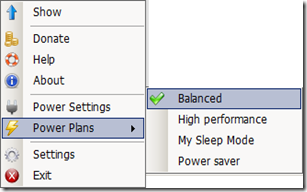
Another great feature of Battery Care is to change the power plan with just 2 clicks! Right click on the system tray icon and you can easily switch between ALL the power plans and not just 2! (I can seriously kill whoever changed Windows 7’s power plan switch option!)
image

Battery Care is really a one man show by Filipe Lourenço! Kudos!

Download Battery Care and give it a try! It is totally worth it!